
For years, I used Adobe Creative Cloud without really thinking about it. Then I discovered Blackmagic Design’s DaVinci Resolve, and I realized I’d been accepting a model that didn’t have to be the only option.
The transition wasn’t something I planned. A friend mentioned they’d been using Resolve for color grading and suggested I try it. I downloaded the free version expecting a stripped-down demo, maybe something useful for basic tasks but ultimately limited. What I found was a fully functional professional editing suite that handled everything I’d been doing in Premiere, After Effects, and Audition, without costing me a cent.
I should mention upfront: I’m not a professional editor. I started my career as a CG and VFX artist, so my relationship with video editing software has always been a bit sideways. I came to editing through the back door, already comfortable with compositing and effects work, which probably colored my experience with both Adobe’s suite and Resolve in ways that might be different from someone with a traditional editing background.
The Price That Actually Makes Sense
Let’s address the obvious: DaVinci Resolve is free. Not free-with-watermarks free. Not free-for-30-days free. Just free. The studio version, which adds some advanced features like collaboration tools and additional effects, currently costs $295 as a one-time purchase. To put that in perspective, two years of Creative Cloud costs more than that, and you’re left with nothing if you ever stop paying.
I’m not opposed to subscription models in principle. I understand that ongoing development costs money and companies need sustainable revenue. But Adobe’s pricing has started to feel less like paying for a service and more like being held hostage. Your projects are locked into their formats, your workflows are built around their tools, and the monthly charge just keeps coming.
When Blackmagic Design offers professional-grade software at these prices (or free), it undermines the argument that video editing tools must cost thousands of dollars over time.
Everything in One Place
One of the unexpected benefits of switching was discovering how much time I’d been wasting jumping between applications. Adobe’s approach splits everything into separate programs: edit in Premiere, composite in After Effects, clean up audio in Audition, maybe touch up stills in Photoshop (which I still use). Each transition means exporting, importing, version tracking, and hoping nothing breaks in the round-trip.
Resolve handles all of this within a single application through different “pages”, Edit, Color, Fusion (for effects), and Fairlight (for audio). Your timeline stays consistent across all of them. If I need to adjust color on a clip, I switch to the Color page. Need to add a motion graphics element? The Fusion page is right there. Audio mixing? Fairlight has tools that rival dedicated DAWs.
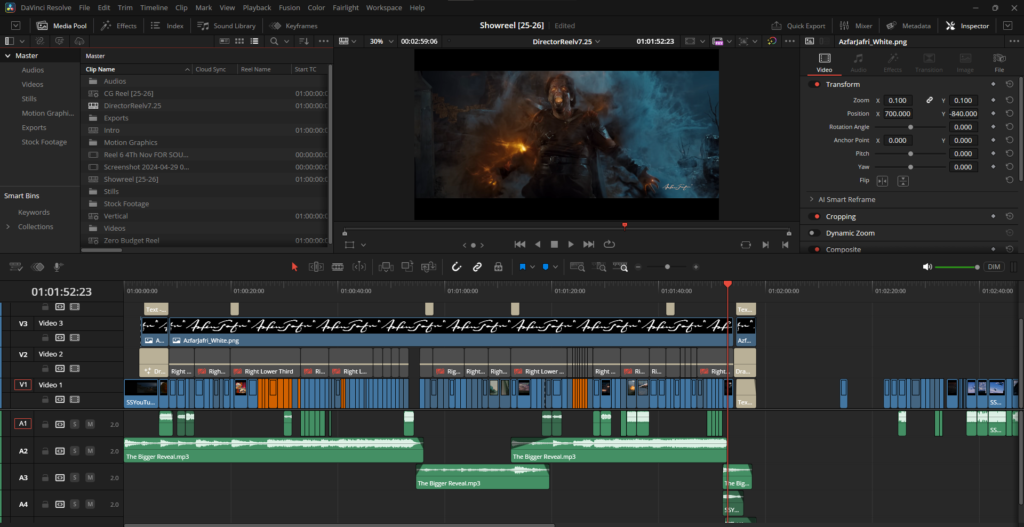
Coming from a VFX background, this workflow difference is huge. In the Adobe ecosystem, I’d be constantly bouncing between Premiere and After Effects, dealing with dynamic links that sometimes worked and sometimes didn’t, managing versions, and losing time to the overhead of switching contexts. In Resolve, everything lives in one project file. The timeline is the timeline, whether I’m editing, compositing, or color grading. It’s a fundamentally different philosophy, and once you experience it, going back feels clunky.
Node-Based Thinking for Effects
Here’s where things got really interesting for me. I learned all my VFX techniques in After Effects, masking, keying, tracking, compositing, the whole toolbox. After Effects is layer-based: you stack things up, apply effects, nest compositions, and build complexity vertically. It works, and for many tasks, it works well.
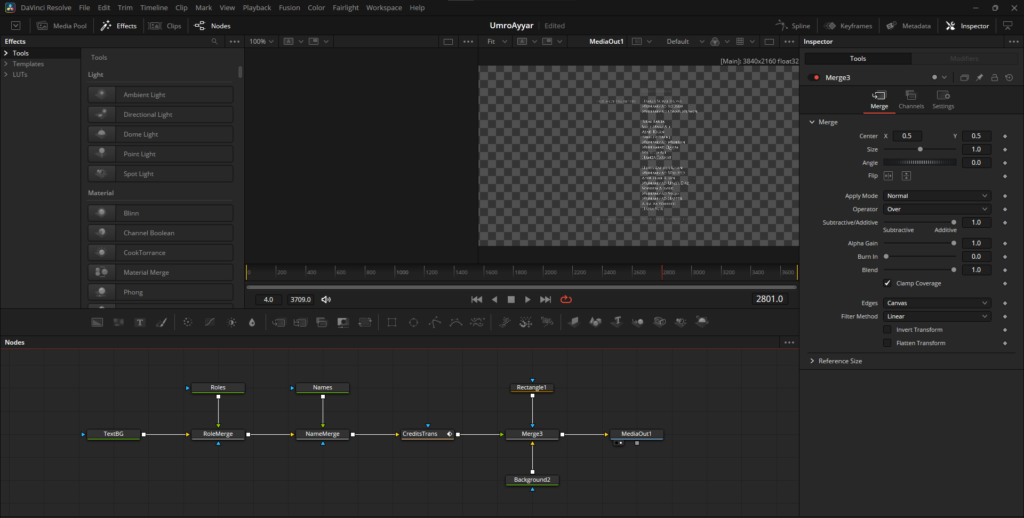
Fusion takes a completely different approach. It’s node-based, like Nuke or other high-end compositing software. Instead of stacking layers, you’re connecting nodes in a flow chart that shows exactly how data moves through your composition. Each node is a single operation, and you wire them together to build complex effects.
I know Nuke is the industry standard for high-end compositing work, it’s what the big VFX houses use for feature films, and for good reason. It’s incredibly powerful and built for the kind of complex, collaborative workflows that productions at that scale require. But Nuke also costs thousands of dollars. For someone like me, working on smaller projects or just trying to develop their skills, that price point puts it out of reach.
Fusion Comes Free With Resolve
Fusion, on the other hand, comes free with Resolve. And while it might not have every single feature that Nuke has, it uses the same node-based philosophy and covers an enormous amount of ground. For the work I’m doing, Fusion does everything I need, and the price point makes it an absolute winner.
At first, the node-based approach seemed needlessly complicated. Why use nodes when layers work fine? But once it clicked, I found myself actually enjoying the process more. The node graph makes your logic visible. You can see the entire signal flow at a glance. Want to try a different approach? Branch off from an earlier node and compare results. Need to isolate a problem? Follow the connections to see exactly where things go wrong.
I won’t claim Fusion does everything After Effects does. AE has decades of third-party plugins and community resources. But for core VFX work, doing it in Fusion turned out to be more intuitive and, honestly, a lot more fun. There’s something satisfying about building a complex composite and being able to see the entire structure laid out logically in front of you.
The Color Tab Is Mind-Blowing
And then there’s the Color page. This is where DaVinci Resolve’s heritage really shows. Before it became an all-in-one editing suite, Resolve was the industry standard color grading tool. High-end colorists used it on major films and commercials. That expertise didn’t go away when Blackmagic added editing features, it’s still there, built into the foundation.
The color tools in Resolve are just on another level. The primary and secondary color wheels, the curve controls, the qualifier tools for isolating specific colors or ranges, it’s all incredibly powerful and surprisingly accessible. You can do things in a few clicks that would require elaborate workarounds in other software.
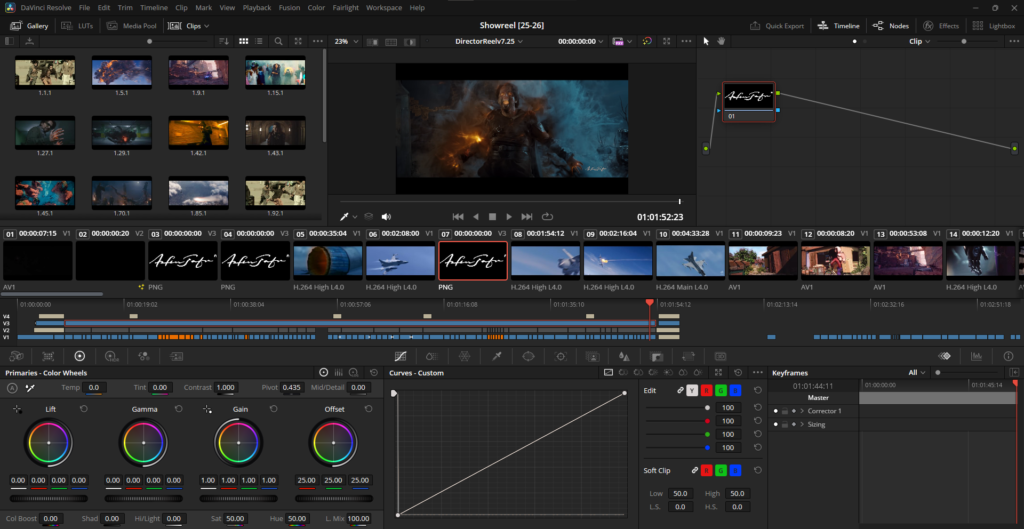
Like Fusion, the Color page uses nodes, which means you can build up your grade in discrete, non-destructive steps. Want to balance your footage first, then add a creative look, then do some final tweaking? Each step gets its own node, and you can adjust or bypass any of them independently. It’s color grading as a craft, not just slapping a LUT on footage and calling it done.
Coming from Adobe, where color correction in Premiere is functional but basic, the Color page feels like discovering you’ve been finger-painting when you could have been using actual brushes the whole time.
A Learning Curve Worth Climbing
I won’t pretend the transition was seamless. Resolve’s interface looked alien at first, even with my VFX background. Different keyboard shortcuts. Tools in unexpected places. The node-based approach in Fusion and Color felt backwards until it suddenly didn’t.
There were moments of frustration where I knew exactly how to do something in After Effects but couldn’t figure out the Resolve equivalent. But here’s what surprised me: once I got past the initial disorientation, Resolve’s design started to make sense in a deeper way. The interface is clean without feeling oversimplified. Everything feels deliberate, like it was designed by people who actually use it for serious work.
The node-based workflow, which initially seemed like a barrier, became one of my favorite aspects. It’s a different way of thinking about compositing and grading, but it’s not a worse way. In many cases, it’s better.
The Piracy Question
Here’s an uncomfortable truth about creative software: a lot of people pirate it. I know professionals who’ve used cracked versions of Adobe products. I’m not endorsing this, but I understand why it happens. When software costs thousands of dollars and you’re just starting out, or working on tight margins, the temptation is real.
What Blackmagic has done is remove that rationalization entirely. You can download Resolve legally, use it professionally, and never pay anything if the free version meets your needs. If you want the advanced features, the current $295 price tag is reachable for most people serious about video work. There’s no excuse to pirate it, and more importantly, there’s no need to.
This matters beyond just individual ethics. When professional tools are accessible, more people can participate in creative work without starting from an illegal position or going into debt for software subscriptions.
Adobe Isn’t Going Anywhere
Let me be clear: Adobe makes excellent software. Photoshop is still the industry standard for photo editing, and like I said earlier, I still use it. After Effects remains unmatched for certain types of motion graphics and has an ecosystem of plugins that’s hard to match. Premiere has features and integrations that some professionals absolutely need.
Adobe is a giant for good reasons. They’ve been at this for decades, and their products reflect that experience. For certain workflows and certain industries, the Creative Cloud might still be the right choice.
But it’s no longer the only choice, and that’s what matters. Competition is healthy. Having viable alternatives means Adobe has to justify its pricing and feature set, and users like me have the freedom to choose what actually works for our needs and budgets.
The Bottom Line
Switching to DaVinci Resolve saved me money, that’s undeniable. But what surprised me more was that it didn’t feel like a compromise. I’m not making do with a cheaper alternative. I’m using software that handles my projects professionally, fits my workflow, and doesn’t treat me like a revenue stream to be optimized.
As someone who came to editing through VFX work, Resolve’s node-based approach in Fusion and Color actually feels more natural to me now than Adobe’s layer-based paradigm. The integrated workflow means less time managing files and more time being creative. And the color grading tools are simply phenomenal, far beyond what I had access to in the Adobe suite.
If you’re on the fence about trying Resolve, my advice is simple: download it. It’s free. The worst that happens is you decide it’s not for you and you’ve lost nothing but a few hours of experimentation. The best that happens is you discover you don’t need to keep paying for tools you can get elsewhere.
I’m not saying everyone should abandon Adobe tomorrow. But I am saying you have options now, real ones, and they’re worth exploring.